This is not a post about getting rich. It’s about slowing down enough to think.
I spent months writing content no one read.
My Reddit account got frozen four months in — I still don’t know exactly why. My posts on X (Twitter) would go up, and two people would see them. Two. I checked multiple times.
I was putting real effort into this. Half the posts on this blog were written past midnight, when something clicked and I couldn’t sleep until I got it down. The gaokao prediction. The civil service exam breakdown. The Buffett punch card. I genuinely believed in this content.
But no one was finding it.
So I asked AI a very simple, slightly desperate question:
“I’ve been banned on Reddit and invisible on Twitter. How do I get people to find my website?”
The Answer I Wasn’t Expecting
I expected AI to say: post more consistently, optimize your headlines, try Pinterest.
Instead it said: build GitHub repositories.
My first reaction was confusion. GitHub is for software engineers. I’m not a software engineer. I build tools in HTML and write blog posts. What does GitHub have to do with me?
AI explained.
When you publish a project on GitHub, you get a page on github.com — one of the most trusted domains on the internet. Search engines see links from that page as high-quality signals pointing to your site. Every repository you create with a README that links back to your blog is a backlink from a domain that Google genuinely respects.
But it went further.
You can also turn your repository into a live website — for free — using GitHub Pages.
Building the First Repository
I told AI I had no idea how to use GitHub. It didn’t mind.
It walked me through every step:
- Create a GitHub account
- Click “New repository”
- Name it something descriptive
- Upload your HTML file
- Write a README that explains what the tool does and links back to your blog
I followed each step. When I got stuck, I asked. When I misread something, AI corrected me without making me feel stupid.
Within 30 minutes, I had my first repository live: the Investment Punch Card — a tool I built based on Warren Buffett’s rule that you only get 20 investments in your lifetime.
The README linked back to my blog. GitHub indexed it. A real backlink, from a real domain, pointing to my site.
Then AI said: now turn it into a live website.
The Moment I Almost Stopped
I clicked into GitHub Pages settings.
And I saw this:
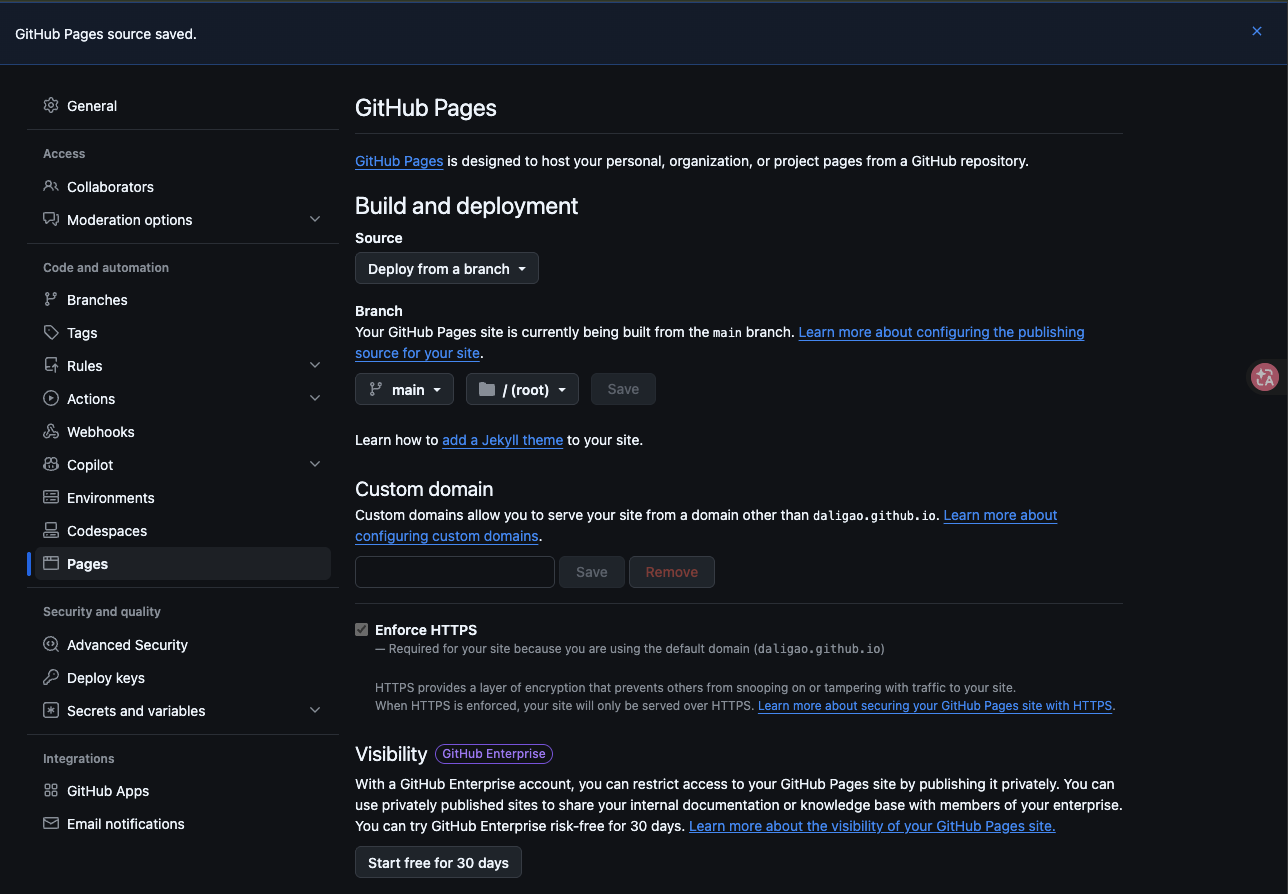
I stopped.
I’d already spent money on hosting, domain, plugins. I wasn’t going to add another subscription. I closed the tab.
But I mentioned it to AI, and AI asked me to read the full text again.
The 30-day trial was for GitHub Enterprise — a paid product for companies that want to make their GitHub Pages private, only visible to internal employees. That’s the enterprise feature. That’s what costs money.
Public GitHub Pages — for anyone with a public repository — is free. Permanently. No trial, no subscription, no card required.
I went back and clicked Save.
What Happened Next
The page went live at daligao.github.io/investment-punch-card.
A working tool. On a real URL. Hosted for free. Linking back to my blog.
I did it again with the China Civil Service Challenge — 7 real questions from China’s government job exam, each with a countdown timer. Another repository. Another README. Another live page. Another backlink.
Then the 2026 Gaokao English Exam — the actual reading section from the exam 12.6 million students sat this year, turned into an interactive quiz.
Three repositories. Three live tools on GitHub Pages. Six backlinks pointing to my blog (two per repository: the repo page itself, and the Pages site).
Zero dollars spent.
What I Actually Learned
GitHub is not just for programmers.
If you build anything — tools, calculators, quizzes, templates — and you have a blog or website you want people to find, GitHub is one of the highest-value places you can publish.
The combination that changed things for me:
- AI knows how GitHub works and can explain it step by step to someone who doesn’t
- GitHub provides free, trusted hosting and permanent backlinks
- GitHub Pages turns your files into a live, shareable URL at no cost
I couldn’t figure this out by searching. Every tutorial I found assumed I already understood what a repository was. AI met me where I was.
People who know AI + GitHub are a century ahead of those who don’t.
The Tools I Built (All Free, All Open Source)
- Investment Punch Card — track your 20 lifetime investment slots, Buffett-style · GitHub · Live demo
- China Civil Service Challenge — 7 real questions from China’s government job exam · GitHub · Live demo
- 2026 Gaokao English Exam — the actual reading section from this year’s national exam · GitHub · Live demo
The Bigger Picture: Information Asymmetry Is the Real Moat
Here’s what I keep thinking about.
The tools I used — GitHub, GitHub Pages — have existed for years. They’re not new. Millions of people use them. The information is publicly available to anyone who searches for it.
But I didn’t know any of this until I asked AI. Not because the information was hidden. Because I never knew what question to ask.
That’s the gap. Not intelligence. Not effort. Not money.
The gap is knowing what questions exist.
Before AI, learning something like this required finding the right community, the right forum, the right person who happened to have figured it out and was willing to explain it from scratch. That could take months. Or you’d never find it at all.
Now I can ask: “I write blog posts that no one finds. What should I be doing that I’m probably not?” — and get a real answer in thirty seconds. Not a generic answer. An answer that accounts for my specific situation, my existing tools, and my actual constraints.
The Reddit ban that felt like a setback turned out to be useful. It forced me to ask a different question. And the different question led somewhere I wouldn’t have found otherwise.
I’m an ordinary person with a blog that currently gets almost no traffic. I have no connections in the tech world. No audience. No budget for advertising.
But I have AI. And AI, it turns out, knows things.
People who know how to use AI + GitHub are a century ahead of those who don’t. Not because the tools are magic. Because the combination removes the biggest barrier to learning anything: not knowing what you don’t know.
Quick Questions
Do I need to know how to code to use GitHub?
No. For what I’m describing — uploading an HTML file and enabling GitHub Pages — you need zero coding knowledge. You just click buttons in a web interface. AI can walk you through every step.
Is GitHub Pages really free forever?
Yes, for public repositories. The “30-day free trial” warning you might see is for GitHub Enterprise — a product for large companies who want private internal pages. If your repository is public, GitHub Pages costs nothing. No credit card, no expiry.
Does a GitHub backlink actually help SEO?
GitHub.com is one of the most authoritative domains on the internet. A link from a GitHub README pointing to your site is treated as a genuine, high-quality signal by Google — not a spam link. It won’t transform your rankings overnight, but it counts, and it’s permanent.
Related Reading
- Warren Buffett Said You Only Get 20 Investments in Your Life. I Built a Tool to Track Mine.
- 12 Million Students. One Exam. I Asked AI to Predict the Questions 6 Days Early.
- My Niece Is Competing for One of China’s Most Sought-After Jobs. I Used AI to Build Her a Study Guide.
- Building in Public Diary — All Entries
Leave a Reply