There’s a specific kind of embarrassment that comes from staring at a blank input box, knowing a verification code expired three seconds ago because you couldn’t hold six digits in your head long enough to type them.
That happened to me. My phone lagged. The SMS code was right there — I read it — and then it was just… gone. I had to request a new one.
I decided to build something about it. Not because I wanted to prove a point about AI, but because I genuinely wanted a cognitive test that felt different from the clinical, joyless tools already online. The result is a free Working Memory Test that embeds digit sequences inside famous quotes and measures your true memory span under dual-task interference. Getting it right meant directing three different AI models through fifteen iterations, making dozens of judgment calls they couldn’t make for me, and inventing one small anti-cheat trick that I’m still quietly proud of.
What I Was Actually Trying to Build
Before any AI wrote a single line of code, I spent time defining what the tool needed to do — and what it needed to not do.
My design requirements: the test had to measure working memory, not just short-term memory. These sound interchangeable but aren’t. Short-term memory holds information passively. Working memory holds and processes it simultaneously under interference — like holding a phone number in your head while answering a question. Researchers link working memory directly to executive function: the mental system governing planning, decision-making, and sustained cognitive performance under load. George Miller’s famous 1956 paper found that humans can hold roughly 7 ± 2 items in this workspace. I wanted to test exactly that limit, under real cognitive load.
My solution: embed the digit sequence inside a famous quote the user has to simultaneously read and process. Not show digits in silence. Make the brain juggle two things at once. That was my design decision. Then I needed someone to build it.
Try It Now
Before the build story, just play it. Most people hit their limit within two minutes:
Scored under 5? There are 10 science-backed tips at the bottom of this post.
Note: This tool is for educational and entertainment purposes only. It is inspired by the digit span subtest of the WAIS-IV but is not a clinical assessment or medical diagnostic instrument. Scores reflect performance on this specific test only and should not be used to diagnose cognitive conditions.
I Asked Three AIs to Help Build It. Here’s What Each One Actually Did.
Gemini: I Gave It the Full Brief. It Built. I Kept Rejecting.
I wrote a detailed product spec before sending anything to Gemini: dual-language quote library, progressive difficulty, anti-cheat system, share cards with challenge links, local score history, milestone confetti at specific levels. I defined the exact mechanic — quote + embedded digits — and the UX flow. Then I handed that brief to Gemini and told it to build.
It could build. What it couldn’t do was make product decisions.
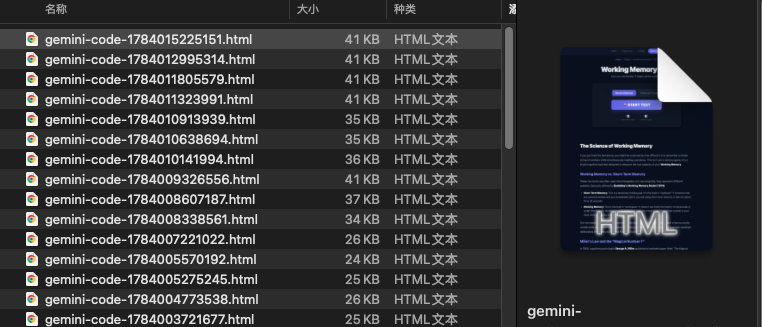
Version 1 ran, but I rejected the scoring logic — it was off by one level. Version 7 looked beautiful but I caught that the difficulty curve broke after level 10. Version 11 introduced a quote-unlock mechanic I hadn’t asked for; I cut it. Version 13 quietly dropped the 10 memory tips that were supposed to appear for low-scoring users — I spotted it in testing and flagged it. By version 15, the core was mostly functional, but I’d identified two bugs that Gemini kept missing because it wasn’t running the tool the way a real user would.
That’s 15 iterations — not because Gemini was bad, but because I kept raising the bar. The screenshot below shows the conversation. This is what directed AI development actually looks like:
Grok: I Brought It In as an Auditor, Not a Builder
After version 15, I made a deliberate choice: don’t ask another AI to keep building. Bring in a different one to audit what already existed. I gave Grok the code and asked specifically for a diagnostic — not a rewrite, not improvements, just: what is broken and why.
That framing mattered. Grok found three things I’d missed:
- A score calculation with an off-by-one error — failing at Level 3 displayed the wrong digit count
- A critical input bug: the Enhanced Mode field was
type="number", which silently strips leading zeros. A code like0372would submit as372and always fail — players would think they’d answered correctly but the game would mark them wrong - The 10 memory improvement tips I’d designed for low scorers had been quietly dropped around version 12 and never restored
I read that diagnosis, verified each issue myself, and built a precise fix list. Then I brought in the third AI.
Claude: I Gave It a Precise Brief. It Finished What I’d Designed.
By this point, my Gemini token budget was gone. I brought Claude in with a completely different kind of brief — not a general product spec, but a specific remediation list with clear acceptance criteria for each item. Fix the type="number" bug. Redesign the result screen with exactly two CTAs. Build a share modal with five sharing methods plus QR code generation without adding another JavaScript library. Restore the 10 memory tips with conditional display logic for scores under 5. Add an Extra Life mechanic so sharing unlocks a retry from the same level.
That precision made the difference. When I told Claude exactly what to change and why, it could execute cleanly. The type="number" → type="text" inputmode="numeric" fix was one attribute but eliminated a whole failure class. The QR code used an API call rather than loading another dependency — my call, not Claude’s. The result was the version you just played.
Three AI collaborators. One product manager making the calls throughout.
The Anti-Cheat Trick I Designed: Why 6 and 9 Are the Secret
Here’s the detail I’m most proud of, and it came entirely from my own thinking about the problem.
In Normal Mode, you pick the correct digit sequence from five options. The wrong options need to look convincingly similar — otherwise the test becomes trivially easy and players can guess without actually recalling. Early versions used simple adjacent-swap distractors. Predictable. After a few rounds, experienced players could eliminate options systematically.
I thought about what makes wrong answers feel right before you verify them. The answer I landed on: visual ambiguity between 6 and 9.
When a distractor swaps a 6 for a 9 (or vice versa) in a long sequence, something specific happens at the edge of cognitive capacity: you’re holding 8 or 9 digits in working memory, your attention is already strained, and your brain pattern-matches “looks right” before it finishes verifying “is right.” You saw 9 but the option shows 6 — and at high digit counts, the error slips through.
I briefed this specific strategy into the distractor generation algorithm. Combined with two other randomized approaches (swap adjacent digits; lock endpoints and scramble the middle), the wrong answers stopped feeling obviously wrong. The 6/9 swap was my idea, not a suggestion from any of the AI tools.
10 Ways to Actually Improve Your Working Memory
These appear in the tool when you score 4 or under. Worth reading regardless — brain training research consistently shows working memory responds to deliberate practice:
- Sleep 7–8 hours nightly. Memory consolidation happens in deep sleep. Cutting it doesn’t just make you tired — it literally impairs new memory encoding.
- 15 minutes of daily cardio. Aerobic exercise increases BDNF, the protein that strengthens neural connections involved in memory formation.
- Use your non-dominant hand occasionally. Routine tasks with the off-hand force novel neural pathways to activate, keeping the brain plastic.
- Visualize, don’t just repeat. After memorizing a sequence, close your eyes and see the digits spatially. Visual-spatial encoding is more durable than repeating them phonetically.
- Practice spaced recall. Recall the same sequence 10 minutes after learning it, then again an hour later. Spacing beats massed repetition in every memory study.
- Cut short-video scrolling. Constant context-switching trains your attention to fragment — the precise opposite of what working memory capacity requires.
- Eat for your brain. Walnuts, eggs, salmon, blueberries. High-sugar ultra-processed food does measurable damage to recall over time.
- Offload trivial information. Write down grocery lists and appointments. Working memory performs better when it isn’t clogged with things that could be externalized.
- Build a scent anchor. Study with a consistent scent nearby — mint or citrus work well. Your brain links the stimulus to the recall state, and retrieval becomes easier when you reintroduce it.
- 5-minute evening recap. Before sleep, walk through your day in sequence. This deliberate recall practice strengthens the episodic memory system over time.
Frequently Asked Questions
What is working memory?
Working memory is your brain’s active workspace — it holds information and processes it simultaneously, rather than storing it passively. It’s central to executive function: reasoning, planning, and multi-step task completion. Most adults can hold 5–7 items at a time. This test measures your personal digit span limit under real cognitive interference.
Is working memory the same as short-term memory?
No. Short-term memory stores information passively for 15–30 seconds. Working memory is active — it keeps information accessible while your brain is simultaneously doing something else. Think of short-term memory as a whiteboard; working memory is that whiteboard while you’re also talking on the phone.
Is this an IQ test?
No. IQ tests measure a broad range of cognitive abilities. This test specifically targets digit span — one component of working memory. A high score here reflects strong short-term verbal memory under interference, not general intelligence. That said, working memory correlates with cognitive performance across many tasks, which is why digit span appears in clinical batteries like the WAIS-IV.
Is working memory trainable?
Research suggests yes. Aerobic exercise, consistent sleep, deliberate memory practice (like this test), and reducing fragmented attention all show measurable effects on working memory capacity. The 10 tips above are drawn from that same research base.
How is this different from a standard digit span test?
Standard digit span tests show digits in silence. I designed this one to embed the sequence inside a quote you have to read simultaneously — that’s cognitive dual-tasking, which is how working memory actually functions under real-world conditions.
What’s a good score?
Based on WAIS-IV research, most adults score 5–7 digits. Reaching 8 puts you in the top 5%. Nine or above is genuinely rare. Scores improve with practice — working memory is trainable, not fixed.
What’s the “Surprise Check”?
At random intervals after a correct digit answer, the test asks who wrote the quote. I added this as an anti-cheat measure: if you were only scanning for the digit string and ignoring the text, you’ll fail it. It also proves the cognitive load is real.
Can I embed this on my own site?
Yes — there’s an iframe embed code at the bottom of the tool page.
Try the Working Memory Test
→ Working Memory Test: Can You Remember 7 Digits While Reading?
Challenge a friend with the share link, screenshot the QR code, or copy the iframe embed for your own site.
Leave a Reply