
I wanted to save on tokens. So I switched to Claude Haiku to build a Live Timeline feature.
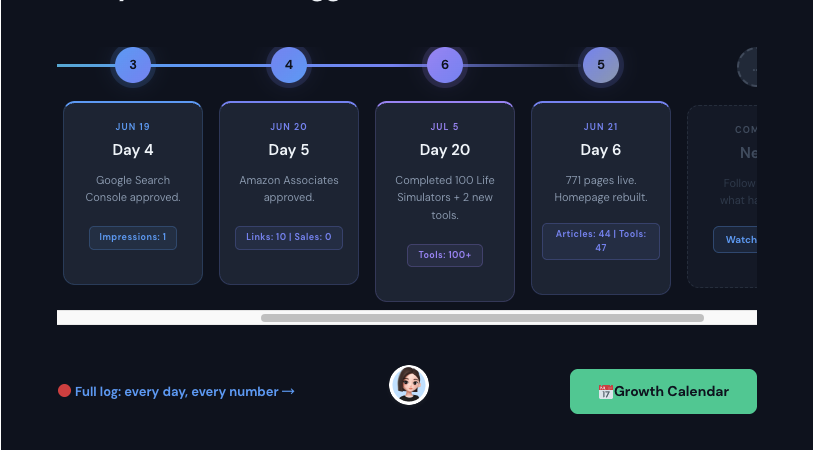
Then it gave me this “time travel” version: Day 20 appeared before Day 6.
This isn’t a joke—this is what using Haiku for complex logic actually feels like.
You’ve probably seen that timeline image by now. This article explains why I finally switched back to Opus.
Update: Yes, the timeline image with Day 6 appearing before Day 5 is intentional—it perfectly captures how Haiku’s problem-solving can feel: out of order, confusing, and ultimately ineffective. 😄
The First Red Flag
It started small. A simple bug fix that should’ve taken 5 minutes with Opus took 15 with Haiku. The model kept misunderstanding context, asking me to clarify things Opus would’ve grasped immediately. I told myself it was just a fluke.
Then came the real test.
I hit a nasty architectural problem in my codebase. The kind where you need the AI to understand not just the code you’re showing it, but the entire mental model of how your system works. With Opus, these conversations usually flow:
- I describe the problem
- Opus asks a clarifying question (the right one)
- I give context
- Opus suggests a solution
- Done. ~5 minutes.
With Haiku? I spent 30 minutes going in circles. The model would:
- Suggest solutions that half-worked
- Miss the architectural constraint I’d mentioned earlier
- Get confused about data flow
- Require me to re-explain the same problem in different ways
By the time Haiku finally understood, I could’ve solved it myself.
Why This Matters for Development
Here’s what I learned: Coding isn’t just about token efficiency—it’s about cognitive bandwidth.
When you’re asking an AI to help solve a complex problem, you need it to:
- Hold multiple constraints in mind simultaneously
- Make connections across files and systems
- Suggest solutions that don’t just work locally, but fit your architecture
- Understand why something failed, not just offer a fix
Haiku can do many of these things. But on complex problems, it struggles. And in software development, “complex” isn’t an exception—it’s the norm.
The Math That Actually Matters
Yes, Haiku costs 95% less per token. But here’s what I calculated:
- One complex problem with Opus: 5 min + $0.50
- One complex problem with Haiku: 30 min + $0.05 + 25 min of my time
If you value your time at even $50/hour, that’s $21 + $0.05 = $21.05 vs $0.50. Haiku just became 42x more expensive.
And that’s not counting the energy drain of watching an AI repeatedly misunderstand you.
When Haiku Actually Makes Sense
Look, I’m not saying Haiku is useless. It’s fantastic for:
- Writing documentation or blog posts (like this one!)
- Generating boilerplate code you’ll review carefully
- Explaining concepts or debugging simple issues
- Tasks where speed matters more than depth
But for active development? For architecture decisions? For debugging the weird edge case that’s been bothering you for an hour? You need Opus.
The Lesson
I switched back to Opus the same day. My API bill went up by maybe 30%. My frustration went down by about 1000%.
Sometimes the cheapest option isn’t the best option. In software development, a 5-minute conversation with a smart AI is worth infinitely more than a 30-minute conversation with a fast one.
The real cost of AI isn’t measured in tokens—it’s measured in whether your problem actually gets solved.
Leave a Reply