This blog exists because I made a decision to stop waiting until I had a perfect plan and just start something with the money I had.
The total cost to get this site live was about 700 Chinese yuan — roughly $96 USD at the time. That covered a domain name and 24 months of web hosting. I’m going to walk you through exactly what I did, because when I was starting out, I kept finding tutorials that either assumed you had a developer background or were trying to sell you a $500 course before giving you the actual information.
I have neither a developer background nor $500 to spend on a tutorial. This is what worked for me.
Step 1: The Domain Name
I bought my domain through Namecheap. The name I wanted — ordinarymantrying.com — cost about $11 per year. The process took about ten minutes. You search for the domain, pay for it, and they give you access to a dashboard where you can point it at your hosting later.
One thing I didn’t know before doing this: the domain registrar (where you buy the name) and the web host (where your actual website files live) are two different things. You don’t have to buy both from the same place. I bought my domain at Namecheap and my hosting elsewhere.
Step 2: Web Hosting
I went with Hostinger for hosting. The reason is simple: it was significantly cheaper than the alternatives I looked at, especially for a 24-month plan, and I’d read enough reviews to feel reasonably confident it wasn’t going to disappear overnight.
[AFFILIATE LINK NOTE: If you want to sign up through my link, you’ll get a discount and I’ll get a small commission — which I’ll be honest about because that’s the kind of blog this is. Link: [HOSTINGER AFFILIATE LINK]]
The setup was more straightforward than I expected. Hostinger walks you through connecting your domain name to their servers (you change two “nameserver” settings in your Namecheap dashboard — they tell you exactly what to type), and within about 24 hours the connection propagates and your domain points at your hosting account.
What I didn’t expect was how well it performs. I ran a Google PageSpeed Insights test on the site recently and the scores came back at 97 for Performance, 100 for SEO, 96 for Best Practices, and 94 for Accessibility — on mobile.
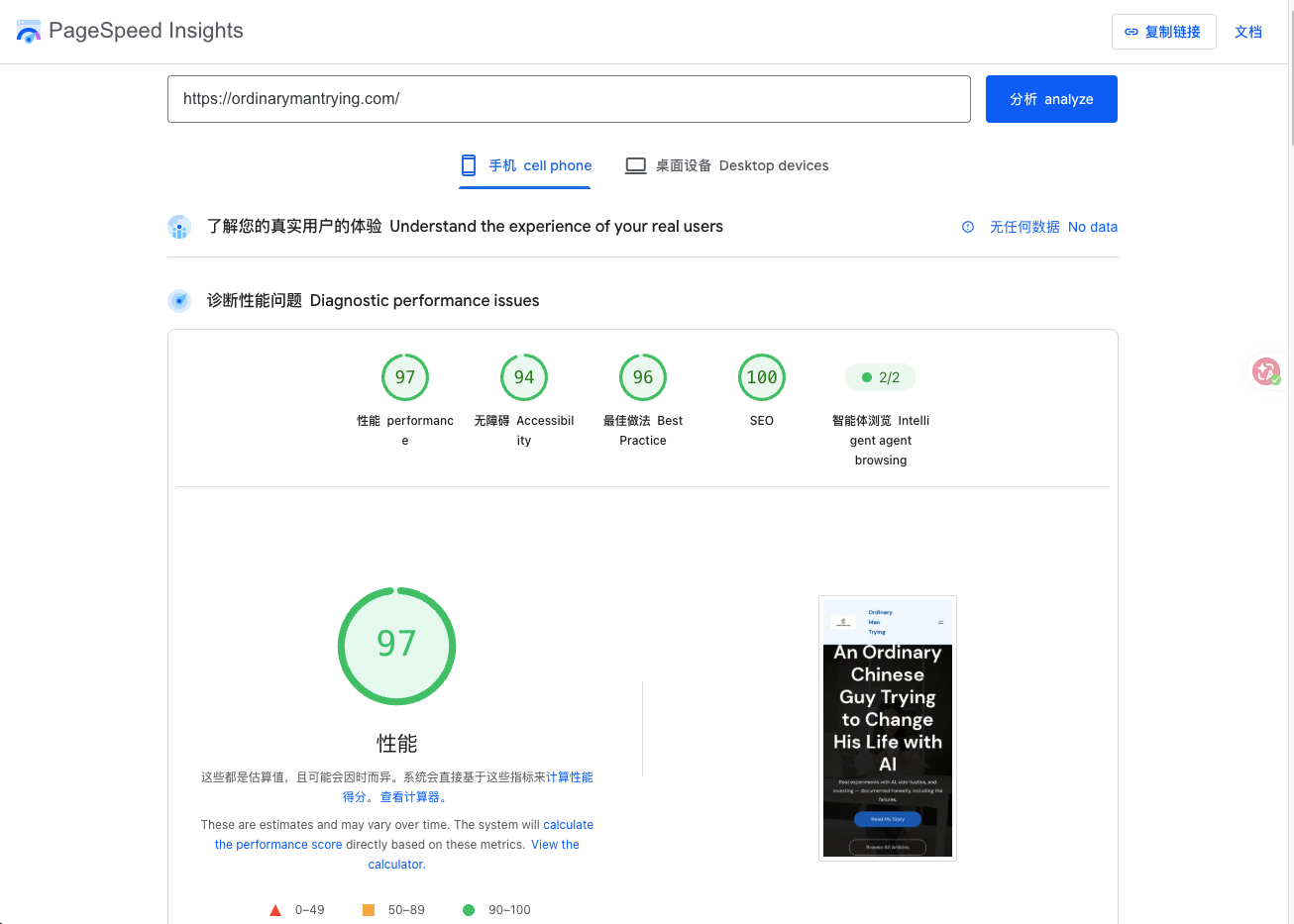
That’s the kind of result people associate with expensive managed hosting. I’m getting it on a plan that costs less than a cup of coffee per month. The combination of Hostinger’s infrastructure, LiteSpeed Cache (a free plugin I’ll mention in Step 3), and a lightweight WordPress theme seems to be doing its job.
Step 3: WordPress
WordPress is free. Once you have hosting, installing it takes about three minutes through Hostinger’s control panel — there’s literally a button that says “WordPress” and you click it.
What you end up with is a basic website that works but looks generic. I installed a free theme called Astra, which let me change the colors and layout without touching any code. I also installed two free plugins: Yoast SEO (helps search engines understand your content) and LiteSpeed Cache (makes the site load faster). Both are free, both took about five minutes each to set up at a basic level.
What Took Longer Than Expected
The technical parts were faster than I thought. What took longer was figuring out what the site was actually for.
I went through two or three different ideas before landing on the honest-personal-blog format this site uses now. The first idea was an AI tool review site, which I abandoned when I realized I don’t have particular expertise in comparing AI tools and there are hundreds of sites doing that already. The second idea was something more structured that I also dropped.
What I kept coming back to was: I have real stories. Six years of a website that never made money. Side hustles I started and quit. Investing mistakes I’m still processing. Those stories are actually mine, and nobody else can write them.
So the “site concept” question ended up being more important than any technical step.
What It Costs to Run Now
Monthly hosting cost works out to less than ¥25 per month (about $3.50). Domain renewal is once a year. There are no other costs — WordPress, the theme, and the plugins I use are all free versions.
The time cost is higher than the money cost: each article takes me a few hours, between thinking through what I actually want to say, writing it, and reviewing it. I use AI to help with the writing — not to replace my thinking, but to help me express it in natural English, which isn’t my first language.
If I hadn’t done this, that 700 yuan would have done nothing. As it is, I have a site, 12 articles, and a project that I think will still exist in five years.
If you’re thinking about starting a blog and have been waiting until you feel “ready” — I spent six years waiting to feel ready with a previous website project. At some point, ready is just a story you tell yourself to avoid starting.
Share your experience or thoughts below.
Related Reading
- Week 1 of Running This Blog: What I Expected vs. What Actually Happened
- I Built a 1,500-Article Website About Making Money — Then Shut It Down. Here’s Why.
- My Goji Berry Website Ran for 6 Years and Never Made Money — Here’s What I Actually Learned
- Building in Public Diary — All Entries
Free Tools From This Blog
Leave a Reply