

A follow-up to: My Website Was Secretly Redirecting Chinese Visitors — I Used AI to Investigate
In my last post on this topic, I described how AI helped me track down a hidden redirect attack on my website. We ran through the files together, found a suspicious Chinese analytics script called 51.la, removed it, and the redirects stopped.
I called it solved. The AI called it solved.
We were wrong.
Or at least: we blamed the wrong suspect. The redirect stopped, but not because 51.la was the cause. A few weeks later, the same attack appeared on another site I run — no 51.la anywhere — and this time, AI helped me find what we should have been looking for the first time: a compromised WordPress plugin hiding its payload in the database, invisible to every file-level scan.
The Same Attack, No 51.la This Time
The second site — a blog I manage — started showing identical symptoms. Mobile visitors using WeChat’s built-in browser were silently hijacked and sent to a virus site after clicking any link. Here’s what they actually saw:

And before landing there, WeChat itself threw a warning:
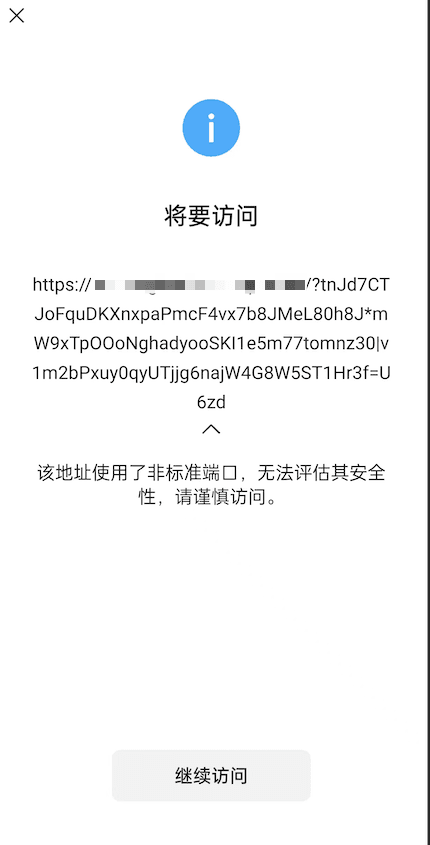
Desktop visitors saw nothing. International IPs saw nothing. Wordfence scanned clean.
I ran the same investigation:
| Location | Result |
|---|---|
| .htaccess | Clean |
| wp-config.php | Clean |
| Theme files | Clean |
| Global search for MicroMessenger | Nothing found |
| Global search for malicious domain | Nothing found |
No 51.la. No external scripts at all. And still: completely clean files.
So I asked the AI to help again — but this time with a different instruction: don’t look at files, look at what the page actually outputs.
The Real Culprit: Ad Inserter
When I fetched the raw HTML of an affected page using a Chinese IP and a WeChat User-Agent, the AI spotted it immediately: an 83KB JavaScript blob being injected into every page that contained:
WeChat: "\bMicroMessenger\b"Plus a link-click hijacker. Plus a daily cooldown mechanism using cookies — which explained why the attack only fired once or twice per day and then went silent.
The code wasn’t in any file. It was stored in the WordPress database, in the wp_options table, as configuration data for an installed plugin: Ad Inserter.
Ad Inserter is a legitimate plugin with half a million active installs. Someone had gotten into the site and configured it to inject a malicious script that:
- Detected WeChat’s browser — only users with
MicroMessengerin their User-Agent got targeted - Applied a cookie-based cooldown — each device only triggered once per day, making testing extremely difficult
- Hijacked link clicks — not a page redirect, but an event listener on every anchor tag
- Left no trace in the files — because WordPress plugin settings live in the database, not on disk
The modification timestamp on Ad Inserter’s files was three weeks earlier than everything else on the server. That was the tell.
Why the AI Got It Wrong the First Time
The first investigation failed because I constrained it to the wrong search space.
I said: search the files. The attacker hid the payload in the database. The AI did exactly what I asked — and found nothing, so it looked for the next-most-suspicious thing in scope: an external script from a Chinese analytics service with a known bad reputation.
51.la looked guilty. It was loaded on every page. It called home to Chinese servers. Its domain showed up in redirect chain analyses. And when I removed it, the attack appeared to stop.
But “appeared to stop” isn’t the same as “actually stopped.” The most likely explanation: the attacker had already moved the payload to another site, or the cookie-based cooldown had simply exhausted its daily quota by the time I started testing post-removal.
About 51.la
To be fair to the AI — and to myself — 51.la is not exactly an innocent bystander.
Its reputation in the web security community is genuinely bad. It has appeared in multiple redirect chain analyses as either a vector or a cover for malicious traffic. Forums are full of reports from site owners who removed 51.la and saw problems stop. Whether it actively injects code, passively enables third-party injection, or simply attracts the same ecosystem of attackers who compromise WordPress sites is unclear. But “remove 51.la” is standard advice in Chinese WordPress communities for a reason.
So: removing it was the right call. We just shouldn’t have stopped there.
Why the Cookie Timing Is Genius (From the Attacker’s Perspective)
The “fires once, then goes quiet” behavior is a deliberate evasion tactic.
If the hijack fires on every single visit, site owners get reports within hours and investigate. If it fires once per device per day using a cookie, most users assume they tapped something accidentally. They close the tab and forget about it. The attack runs for weeks.
The cookie also means:
- Regular visitors never see it — they already have the cookie set from their first visit
- The site owner never sees it — too many prior visits, always has the cookie
- Testing more than once with the same phone gives a false clean result
And this is why redirect stopped ≠ malware removed. One successful test after removing a suspected cause proves nothing if the attack mechanism was never confirmed.
What Actually Fixed It
- Deactivated and deleted Ad Inserter
- Cleared the LiteSpeed cache — critical: cached pages continue serving the injected script even after the plugin is gone
- Confirmed with a WeChat scan from a Chinese IP: clean
The redirect has not reappeared.
What I Changed About My AI Workflow
Three rules I now apply to any AI-assisted security investigation:
1. Don’t let AI define the search space too early. The moment I said “check these files,” the AI accepted that as the full scope. Start with “what could this attack look like from the outside” before narrowing to “check X.”
2. Give AI raw evidence, not symptoms. “My site is redirecting mobile users” is a symptom. The rendered page HTML from an affected User-Agent is evidence. The AI found the malicious payload in seconds when I gave it the actual page output. It failed when I gave it symptoms and asked it to guess.
3. Never call a security incident solved after one successful test. Redirect stopped ≠ malware removed. The attack had a built-in cooldown that made “test once, looks clean” completely unreliable. A proper resolution requires knowing why the redirect stopped, not just that it did.
The Honest Verdict
Before anything else: this isn’t a story about AI being too weak or too limited. It’s a story about a piece of malware that was specifically engineered to defeat investigators.
Think about the design: same device only triggers once per day, so every repeat test looks clean. Invisible on desktop. No footprint in any file. Only surfaces on a phone, in WeChat, from a Chinese IP, on the first visit. The person who built this wasn’t writing a sloppy script — they were solving an optimization problem. Maximum infection time, minimum chance of discovery. Money is a powerful motivator for smart engineering, and whoever did this was very smart.
Without AI, I had no realistic path to diagnosing this. The only practical option would have been a full WordPress reinstall — which would have fixed it, but left me with no idea what happened or how to prevent it next time. AI didn’t just help me find the answer. It made finding the answer possible at all.
The AI made a confident call that turned out to be wrong. It blamed 51.la because that’s where the evidence pointed, given what we were searching. It didn’t know to look in the database.
But when I gave it the right input — the actual rendered page HTML from an affected device — it found the injected payload in seconds and identified exactly what was happening.
That’s the real lesson: AI-assisted investigation is only as useful as the evidence you put in front of it. Garbage in, confident-but-wrong answer out. Good evidence in, useful answer out.
The tool is fine. The process needed fixing.
Both sites are now clean. I’ve audited all installed plugins, reduced plugin count significantly, and changed the investigation protocol for any future incidents: start with rendered page source, not file contents.
Related Reading
Leave a Reply