
I almost didn’t try Hostinger.
The pricing seemed too low to be serious — around $2–3/month with promo codes. My experience with “cheap hosting” had always been slow load times, clunky dashboards, and support that disappears when something breaks. So when I saw Hostinger’s prices, I assumed it was one of those.
I was wrong. Here’s my honest account of one month using it — written from the perspective of someone based in China, who compared it against the alternatives actually available here.
Background: Why I Needed a New Host
I run this blog and previously used BandwagonHost — a popular choice among Chinese users for overseas VPS. It worked fine at first, but I started noticing sluggish load times for readers outside China, and the price-to-performance ratio started to feel off. I wanted something faster, simpler, and better suited to a WordPress blog serving a global audience.
Speed: Tested Across Four Tools
I ran the site through four speed testing tools after setup. The results were consistent enough that I stopped worrying about whether any single tool was having a bad day.
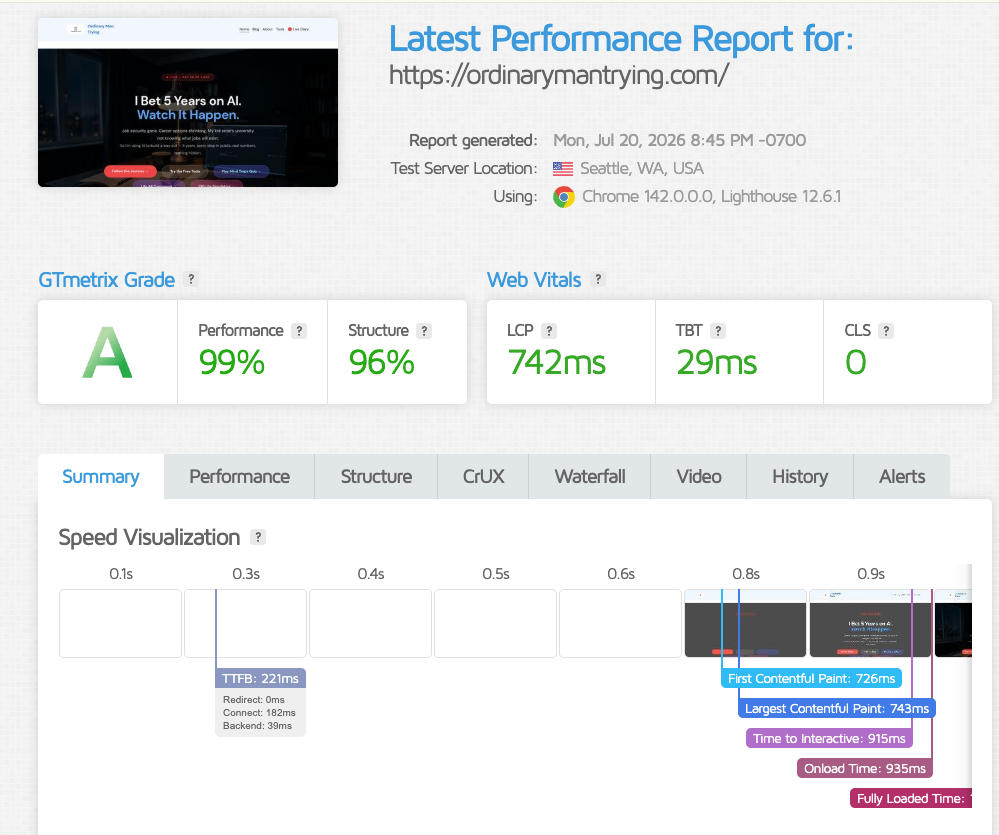
GTmetrix: Grade A, 99% Performance
Tested from Seattle, USA. LCP 742ms, TBT 29ms, CLS 0. For shared hosting, this is not what you expect.
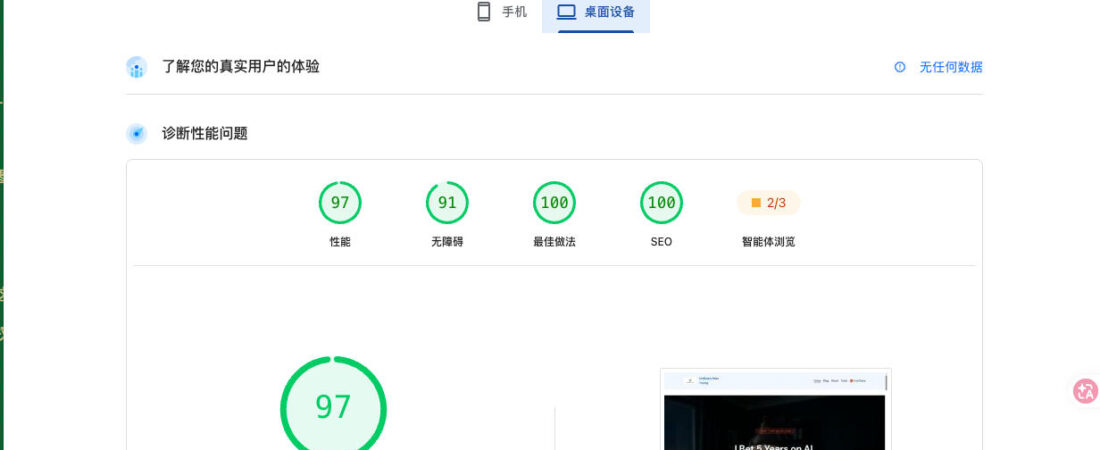
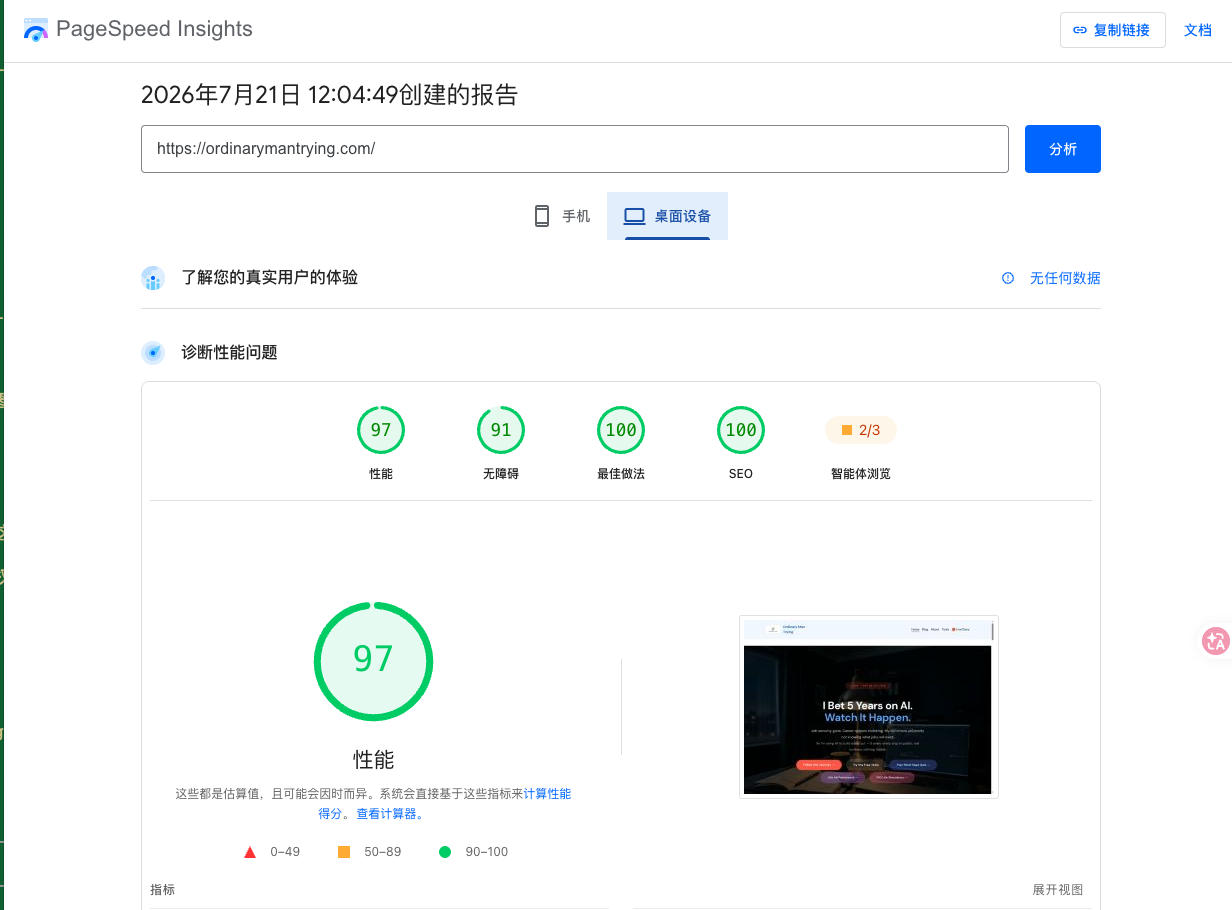
Google PageSpeed Insights: 97 Desktop
Performance 97, Best Practices 100, SEO 100. Google’s own tool scoring SEO 100 on a WordPress blog is a reassuring sign.
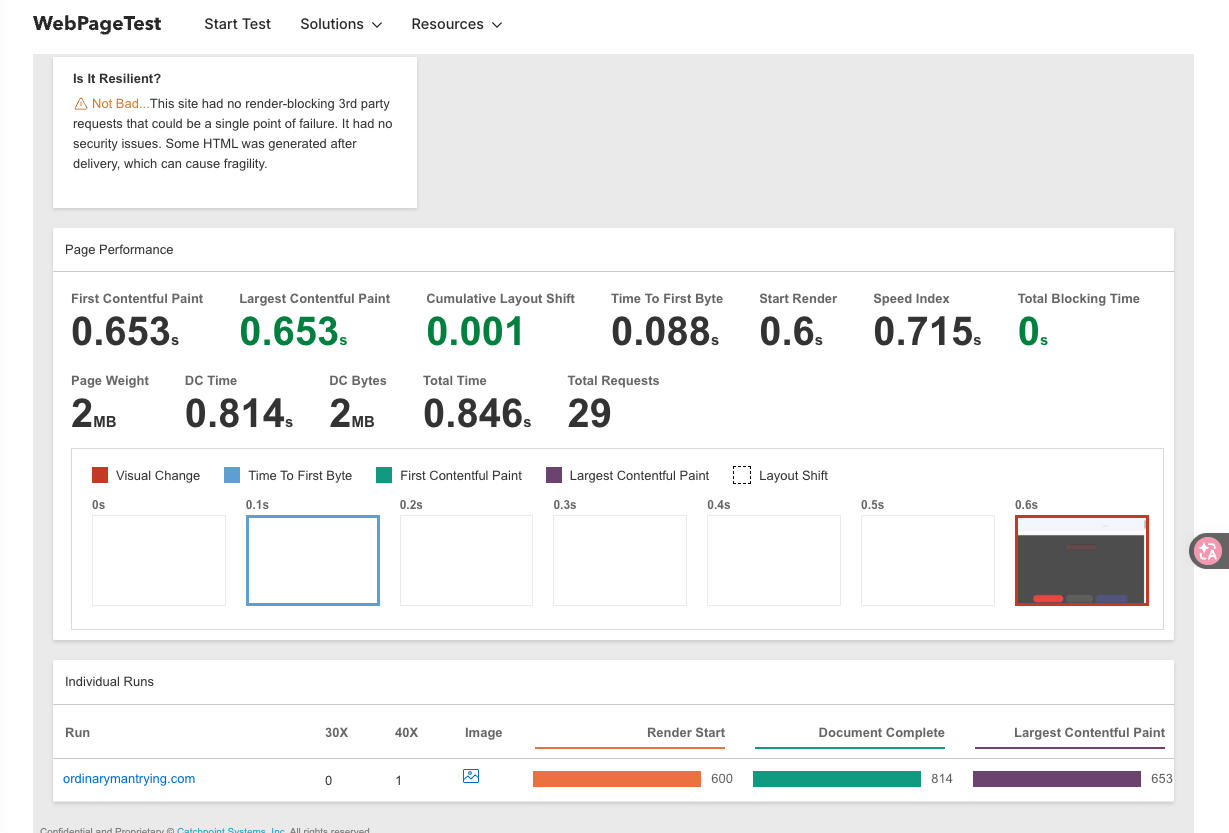
WebPageTest: LCP 0.653s, TTFB 88ms, TBT 0
TTFB of 88ms is the standout figure — the server responding in under 0.1 seconds. Total Blocking Time of 0 means no JavaScript blocking render. Total load 0.846s.
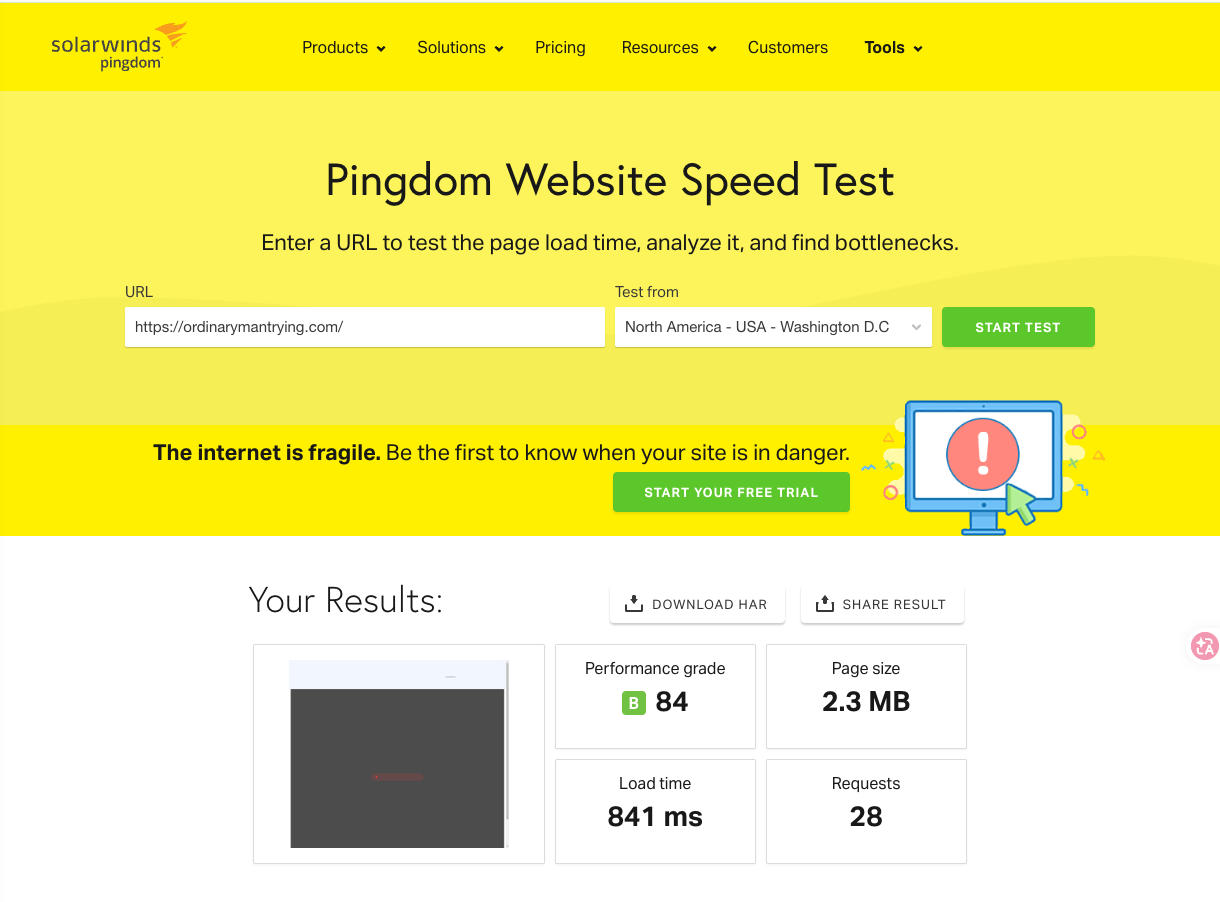
Pingdom: B/84, 841ms
The one outlier. Pingdom flagged a compression issue — this is because LiteSpeed uses Brotli compression rather than Gzip, and Pingdom doesn’t always detect Brotli correctly. The 841ms load time is solid. Page size dropped from 2.3 MB to ~2 MB after I enabled WebP image conversion in LiteSpeed Cache.
Compared to my previous BandwagonHost VPS, Hostinger loaded noticeably faster for international visitors. The VPS had more raw specs on paper, but Hostinger’s LiteSpeed server and built-in caching delivered faster WordPress performance in practice.
Bottom line on speed: three out of four tools gave top-tier results. The fourth (Pingdom) had a detection quirk, not a real performance issue. I’m satisfied.
👉 Check Hostinger’s current pricing →
The Interface: Zero Learning Curve
Hostinger’s hPanel is clean and readable in a way cPanel never managed to be. WordPress one-click install: 90 seconds. SSL activation: one button. I didn’t need to Google anything during setup, which is unusual for a new hosting dashboard.
If you’ve never set up a website before, this is probably the most friction-free starting point available. The phrase “zero learning curve” gets overused in hosting marketing — here it’s accurate.
Price: What It Actually Costs vs the Alternatives
This section looks different depending on where you’re reading from. If you’re in China, the comparison is especially stark — because the main alternatives available to Chinese users who want to host internationally are significantly more expensive and more complicated.
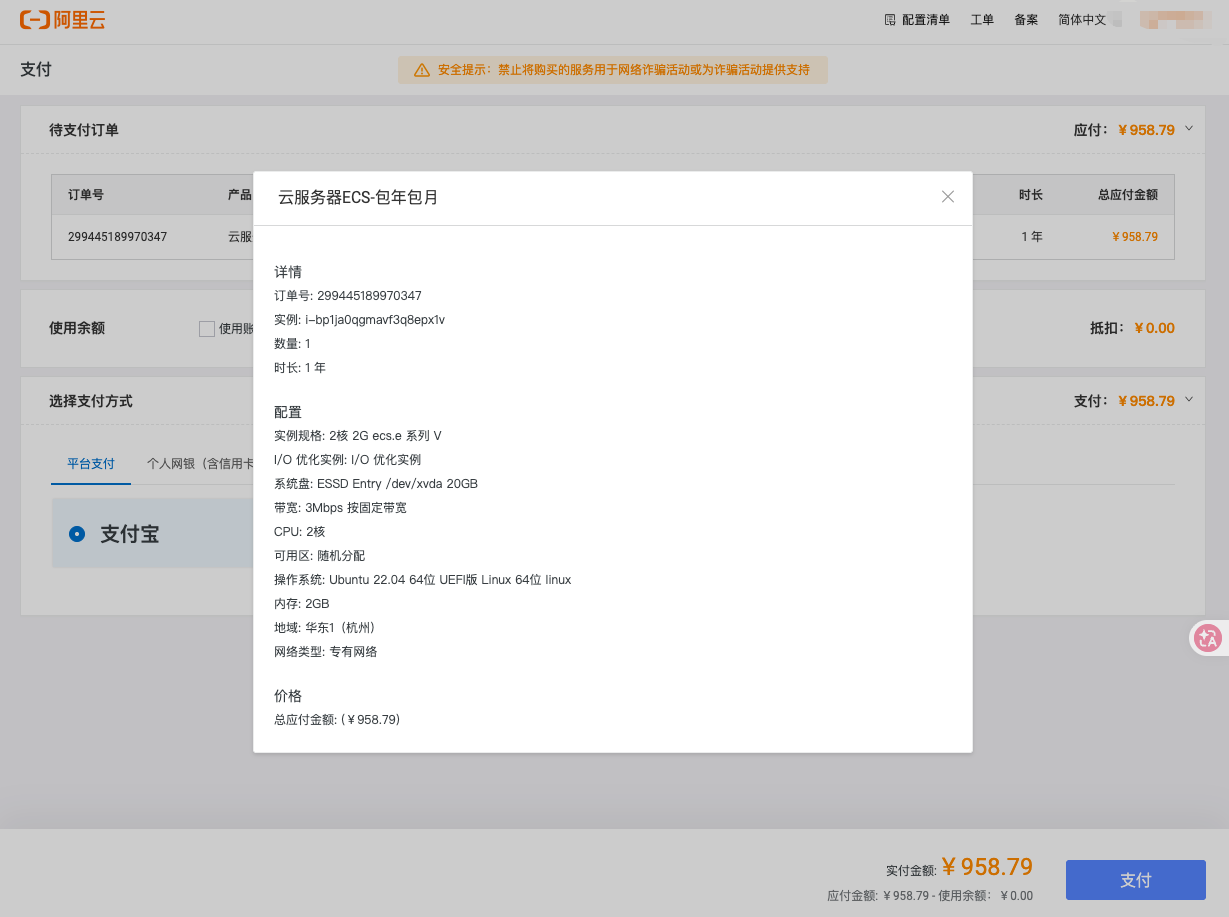
Aliyun (Alibaba Cloud) ECS: ¥958.79/year
2 vCPU, 2GB RAM, 20GB SSD, 3Mbps bandwidth. This is a bare VPS — you configure the web server, PHP, MySQL, and WordPress yourself. Promotional prices of ¥60–99 exist but require new account registration, real-name verification with ID card, and are strictly one-per-person.
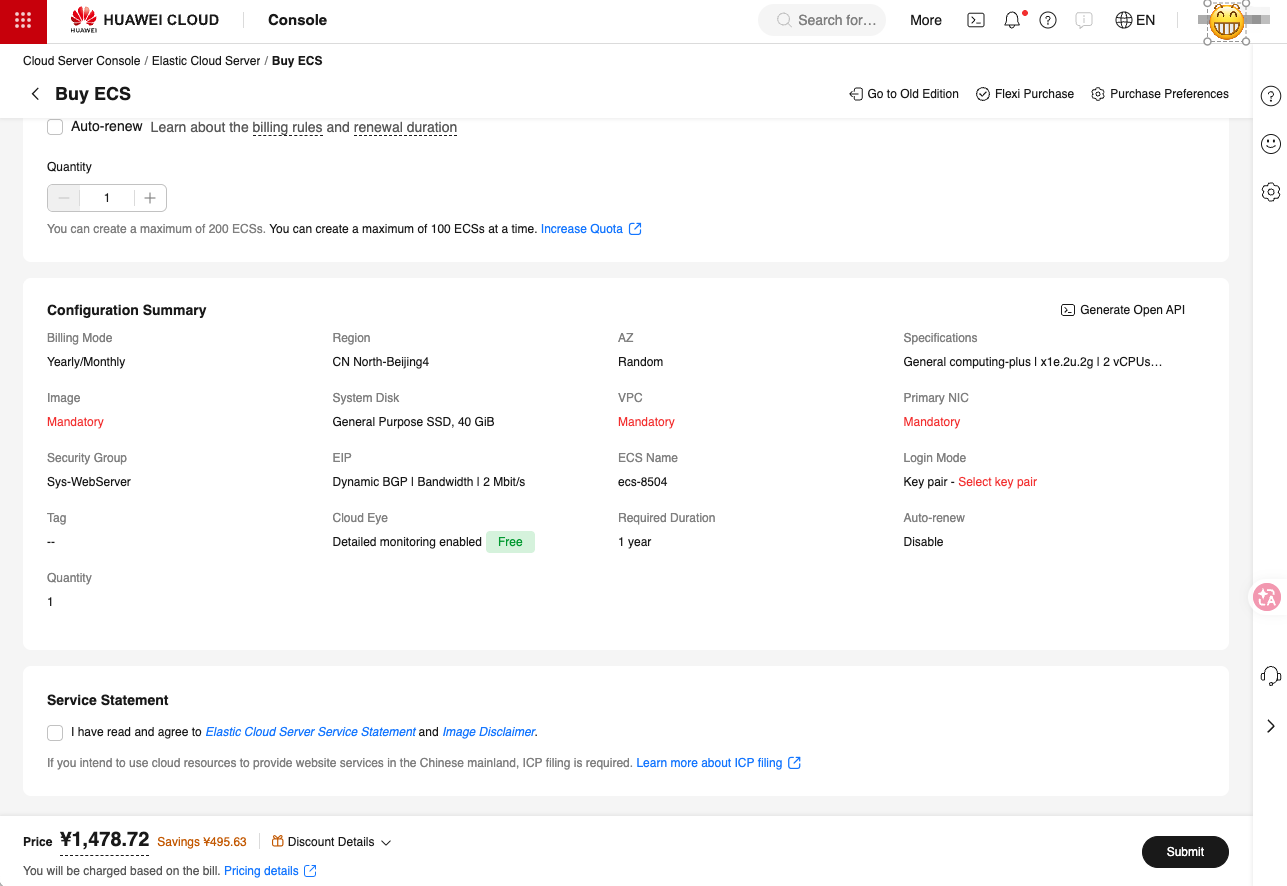
Huawei Cloud ECS: ¥1,478.72/year (after discount)
2 vCPU, 2GB RAM, Beijing region. ¥1,478 is the discounted rate — pre-discount is higher. Same situation as Aliyun: bare VPS, manual configuration, and the checkout page explicitly notes that ICP filing is required for sites serving mainland China users.
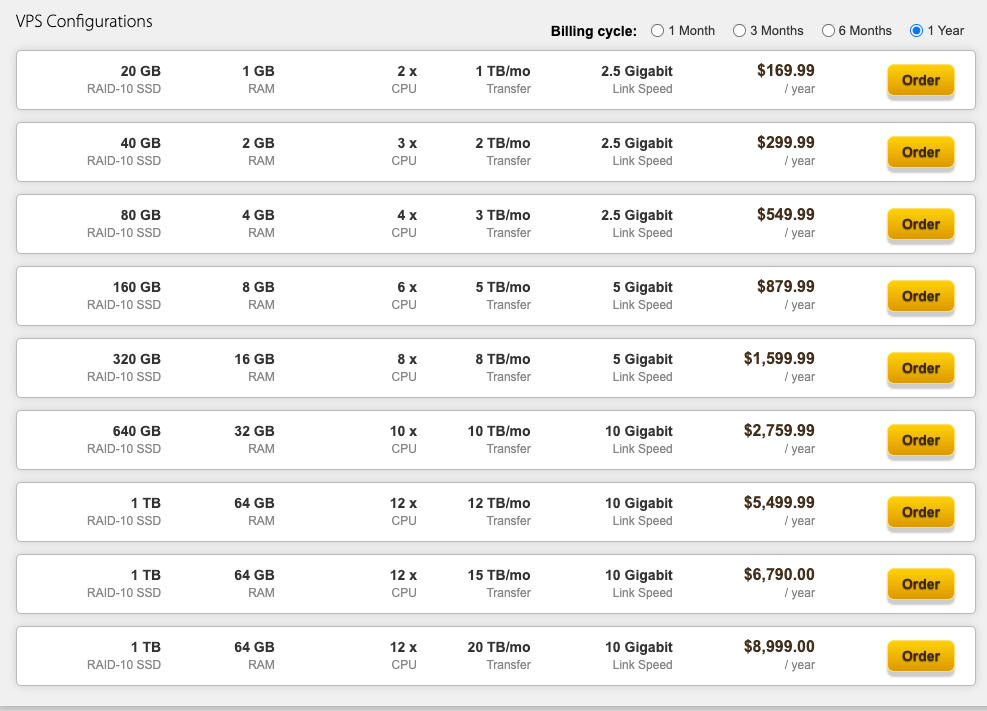
BandwagonHost VPS: $169.99/year
1GB RAM, 2 CPU, 20GB SSD, 1TB transfer — about ¥1,230/year. China-optimized CN2 GIA routing is BandwagonHost’s main selling point. But on raw WordPress performance for international audiences, Hostinger came out faster in my tests. And it’s still a bare VPS requiring manual setup.
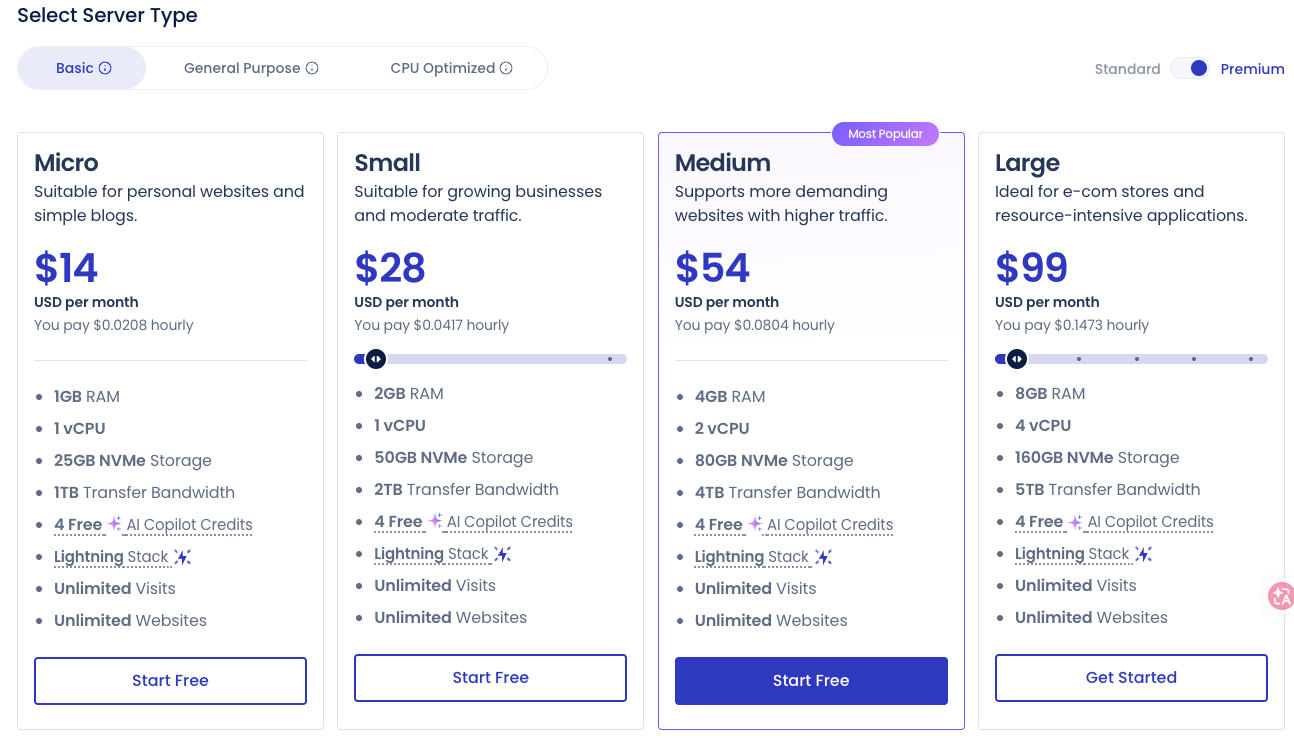
Cloudways: $14–99/month
Managed cloud hosting on major providers. Good product, but $168–$1,188/year puts it in a different category — more suited to businesses with existing revenue to justify the cost.
Hostinger vs BandwagonHost: Direct Comparison
Since I actually switched from BandwagonHost to Hostinger, here’s the honest side-by-side:
| Hostinger Business | BandwagonHost VPS (entry) | |
|---|---|---|
| Price | ~¥300–600/year | $169.99/year (≈¥1,230) |
| Type | Managed shared hosting | Bare VPS (self-configured) |
| WordPress setup | One-click, 90 seconds | Manual install required |
| GTmetrix grade | A (99%) | Not tested after switch |
| TTFB | 88ms | Noticeably slower in my experience |
| International speed | Fast (LiteSpeed + CDN) | Good for China, variable abroad |
| Technical skill needed | None | Linux/server basics required |
| Best for | Bloggers, side projects, international sites | Developers who need China-optimized routing |
One note on pricing: Hostinger’s first-year rate is heavily discounted. Renewal prices are higher — this is common across the industry but worth knowing before you commit. Choosing a longer initial term (2–4 years) locks in the promotional rate for longer.
Who This Is (and Isn’t) For
Hostinger shared hosting is a good fit if you are:
- A blogger, writer, or creator building a personal site or side project
- A Chinese user who wants to build a site for an international audience
- Someone who wants WordPress running fast without configuring a server
- Starting out and want to keep costs low while you figure out whether the project is worth scaling
It’s probably not the right choice if you are:
- Running a high-traffic e-commerce store that needs dedicated resources
- Building something where server-level control matters (custom software stacks, specific PHP configs)
- Primarily serving mainland China users — domestic hosting with ICP filing may be a better fit for that audience
- Expecting enterprise-level support response times
One Honest Bug: FTP File Visibility
I want to include this because a review that only says positive things is useless.
I noticed something odd when accessing files via FTP: the file structure I saw through my FTP client didn’t fully match what was showing up when I accessed the site through the browser. Files I expected to find via FTP weren’t visible, and vice versa.
Everything functioned normally on the front end — the site loaded fine, WordPress worked without issues. But the FTP discrepancy was confusing until I worked out it was likely a caching or directory mapping issue on LiteSpeed’s side. Worth knowing about if you manage files via FTP regularly.
It didn’t cause real problems for my workflow. But it’s the kind of thing that would frustrate me at 2am during a migration.
After One Month: Summary
I can’t speak to long-term reliability, how support handles pressure, or performance as the server fills up. Those are fair unknowns after one month.
What I can say: for a personal blog or side project, Hostinger has delivered the best hosting experience I’ve had at any price point. Speed is real and consistent across four testing tools. The interface removes friction. And the price — especially compared to the alternatives available to Chinese users wanting to host internationally — is hard to argue with.
I expected to spend the first weekend fighting setup. Instead I spent it writing content.
👉 See Hostinger’s current pricing →
Updates
I’ll keep using Hostinger and update this post at the 3-month and 6-month marks — covering how performance holds up over time, whether I’ve run into any resource limits, and what renewal pricing looked like. If you want to see the follow-up, the easiest way is to subscribe to the blog.
All observations are based on my own use. I have an affiliate arrangement with Hostinger — this means I earn a commission if you purchase through my link, at no extra cost to you. I was not sponsored, paid, or asked to write positively. The FTP bug section exists for a reason.
Leave a Reply